
.png)
Developer Home
Welcome to the System Administrator configuration home! These articles ... Lorem ipsum dolor sit amet, consectetur adipiscing elit, sed do eiusmod tempor incididunt ut labore et dolore magna aliqua. Lorem ipsum dolor sit amet, consectetur adipiscing elit, sed do eiusmod tempor incididunt ut labore et dolore magna aliqua. Lorem ipsum dolor sit amet, consectetur adipiscing elit, sed do eiusmod tempor incididunt ut labore et dolore magna aliqua. Lorem ipsum dolor sit amet, consectetur adipiscing elit, sed do eiusmod tempor incididunt ut labore et dolore magna aliqua.
Getting Started
The STEPS below provide the generaly flow of control that you need to go through in order to Lorem ipsum dolor sit amet, consectetur adipiscing elit, sed do eiusmod tempor incididunt ut labore et dolore magna aliqua.
.jpg)
.jpg)
.jpg)

What is the playLINK SDK?
playLINK is the playSTUDIOS SDK for games and is intended to reduce the level of effort required to integrate an existing game into the playSTUDIOS ecosystem. playLINK is a centralized location for the tools that a Partner needs to have a successful playSTUDIOS game!
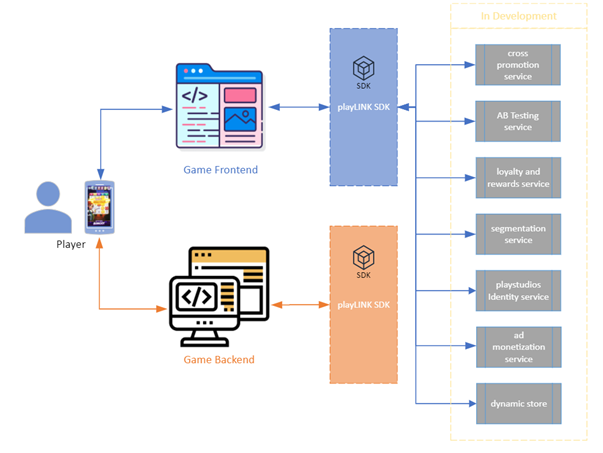
The playLINK platform provides the following:
Customer Data Platform (via mParticle) – The collecting, managing, and sharing of customer-centric data.
User Acquisition Solutions (For a UA Automation Tutorial, click here) – Replaces Adjust
Marketing Campaign Solutions (Via Braze) - Email and push notifications
Loyalty Profile/Data Integration - Loyalty, Rewards, and myVIP
The playLINK SDK: Setup
Lorem ipsum dolor sit amet, consectetur adipiscing elit, sed do eiusmod tempor incididunt ut labore et dolore magna aliqua.
iOS SDK

Android SDK

Introduction and Setup
SDK Reference
playLINK SDK - Android
Unity SDK

Introduction and Setup
SDK Reference
playLINK SDK - Unity
or
Identity API
The playLINK Identity API provides the framework for using an players email address to identify a user to a partner application.
Coupons API
A collection of methods of using and manging the playLINK couponing system.
Adminutilis API
A collection of methods for creating, reading, updating, and deleting partner subscription keys.
Authentication API
Validate partner appliction login and create a session token.
playLINK API Reference
As a developer, you have access to the following APIs. The links below take you to the reference and informational pages for the playLINK API you selected.
Lorem ipsum dolor sit amet, consectetur adipiscing elit, sed do eiusmod tempor incididunt ut labore et dolore magna aliqua.